Adding Plausible to Mastodon Using nginx sub_filter
I’m running an instance of Plausible Analytics Community Edition on my VPS, mostly so I can see how many people read my blog.
I don’t actually need analytics - I have no plans to monetise the site - but it’s interesting to see what people engage with, and self-hosting Plausible was an itch I wanted to scratch anyway.
In this post I’ll explain how I also injected Plausible Analytics into my Mastodon instance’s web UI, and then explain why you probably shouldn’t do this yourself 😁
Set up Plausible Analytics
Start by creating a new site in Plausible and copying the tracking code it gives you.
It’ll look something like this:
<!-- Privacy-friendly analytics by Plausible -->
<script async src="https://plausible.example/js/pa-abcdef.js"></script>
<script>
  window.plausible=window.plausible||function(){(plausible.q=plausible.q||[]).push(arguments)},plausible.init=plausible.init||function(i){plausible.o=i||{}};
  plausible.init()
</script>
The first thing we’ll do is remove comments and unnecessary whitespace so the whole thing fits on a single line. This is purely because nginx’s sub_filter is much easier to work with that way:
<script async src="https://plausible.example/js/pa-abcdef.js"></script><script>window.plausible=window.plausible||function(){(plausible.q=plausible.q||[]).push(arguments)},plausible.init=plausible.init||function(i){plausible.o=i||{}};plausible.init()</script>
Keep this handy - you’ll need it in the next step.
Configure sub_filter
On your Mastodon server, open your nginx configuration file (for me this lives at /etc/nginx/sites-enabled/mastodon) and find the @proxy location block.
We’ll use sub_filter to replace the closing </body> tag with our Plausible script followed by </body>:
server {
    [...]
    location @proxy {
        [...]

        sub_filter '</body>' '{your tracking script here}</body>';
        sub_filter_once on;
    }
}
Replace {your tracking script here} with the single-line Plausible snippet from above.
Then validate and reload nginx:
nginx -t
systemctl reload nginx
Fix Content Security Policy headers
If you now load your Mastodon instance in a browser, you’ll see two errors in the console:
Loading the script 'https://plausible.example/js/pa-abcdef.js' violates the following Content Security Policy directive: "script-src 'self' https://mastodon.example 'wasm-unsafe-eval'". Note that 'script-src-elem' was not explicitly set, so 'script-src' is used as a fallback. The action has been blocked.
and:
Executing inline script violates the following Content Security Policy directive 'script-src 'self' https://mastodon.example 'wasm-unsafe-eval''. Either the 'unsafe-inline' keyword, a hash ('sha256-Ui4JgH0e3Hy16saR0evkbiiRF3sLnhJ6gTgTVWOYDFI='), or a nonce ('nonce-...') is required to enable inline execution. The action has been blocked.
This is expected. Mastodon’s Content Security Policy correctly blocks both the external Plausible script and the injected inline JavaScript.
To fix this, we need to extend the existing CSP.
Extract the current CSP
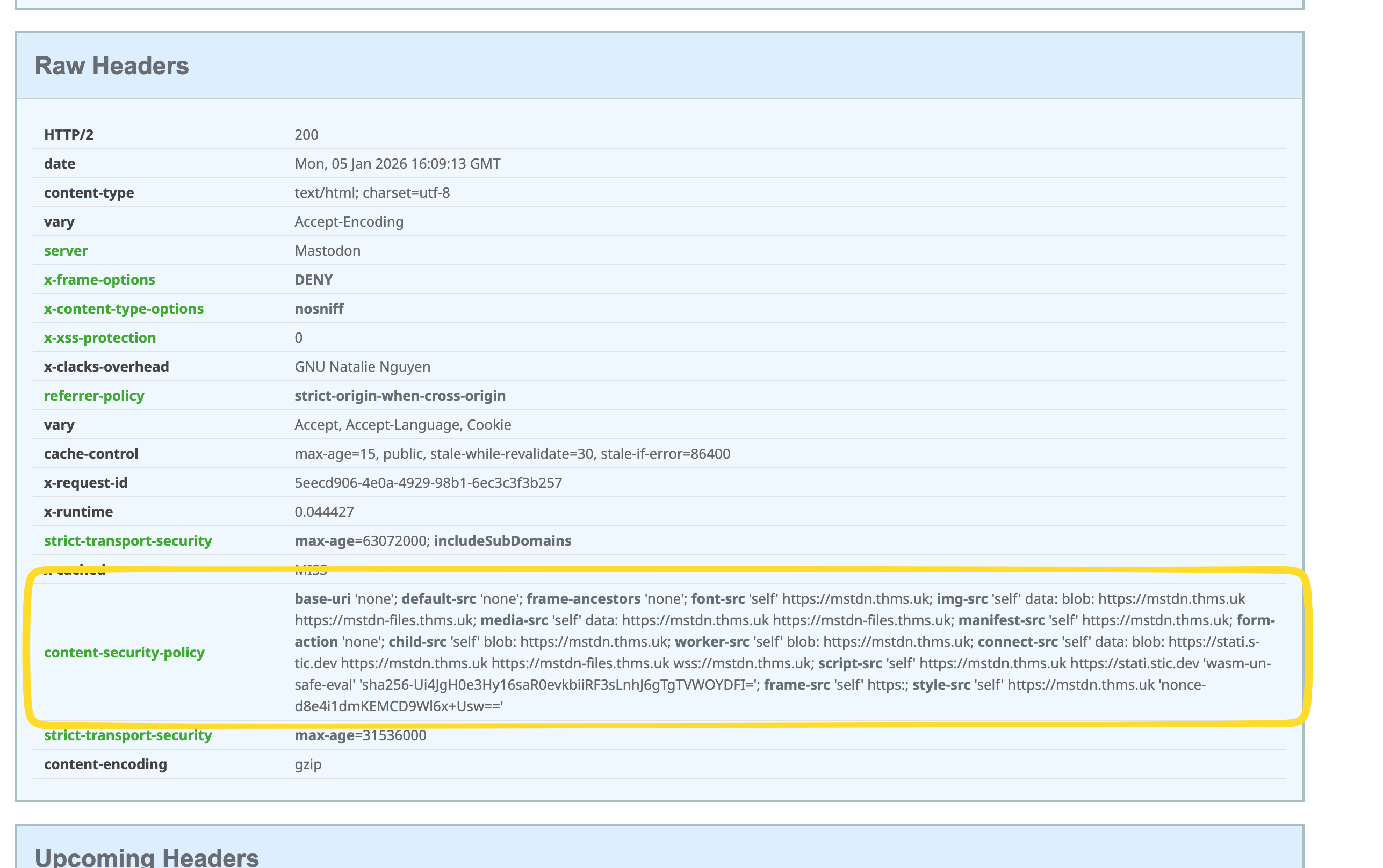
First, grab the CSP header your instance currently sends. There are several ways to do this; one easy option is to visit securityheaders.com and enter your Mastodon URL.
Scroll down to Raw Headers and copy the content-security-policy header into your editor.
Update connect-src
Find the connect-src directive and add your Plausible domain:
connect-src 'self' data: blob: https://mastodon.example https://media.mastodon.example wss://mastodon.example https://plausible.example;
Update script-src
Next, update the script-src directive. You need to add:
- Your Plausible domain
- The SHA-256 hash shown in the browser error for the inline script (replace the example hash below with your own)
Example:
script-src 'self' https://mastodon.example 'wasm-unsafe-eval' https://plausible.example 'sha256-Ui4JgH0e3Hy16saR0evkbiiRF3sLnhJ6gTgTVWOYDFI='
Example full CSP
Putting it all together, your final header might look something like this:
base-uri 'none'; default-src 'none'; frame-ancestors 'none'; font-src 'self' https://mastodon.example; img-src 'self' data: blob: https://mastodon.example https://media.mastodon.example; media-src 'self' data: https://mastodon.example https://media.mastodon.example; manifest-src 'self' https://mastodon.example; form-action 'none'; child-src 'self' blob: https://mastodon.example; worker-src 'self' blob: https://mastodon.example; connect-src 'self' data: blob: https://stati.stic.dev https://mastodon.example https://media.mastodon.example wss://mastodon.example https://plausible.example; script-src 'self' https://mastodon.example https://stati.stic.dev 'wasm-unsafe-eval' https://plausible.example 'sha256-Ui4JgH0e3Hy16saR0evkbiiRF3sLnhJ6gTgTVWOYDFI='; frame-src 'self' https:; style-src 'self' https://mastodon.example 'nonce-d8e4i1dmKEMCD9Wl6x+Usw=='
Note
Your CSP will differ from mine. Differences may include:
- Different domains
- No separate media domain
- Different nonces (or none at all)
- A different SHA hash for the inline script
- Plenty of other small variations
Do not copy this header verbatim. Don’t even use it as a starting point. Use your own CSP as a base and apply only the changes described above.
Apply the new CSP in nginx
Open your nginx config again and return to the @proxy location.
Add two directives: one to remove Mastodon’s CSP header, and one to add your modified version:
server {
    [...]
    location @proxy {
        [...]
        proxy_hide_header Content-Security-Policy;
        add_header Content-Security-Policy "{your header here}" always;
    }
}
Replace {your header here} with your full CSP string. Make sure it’s wrapped in double quotes, uses single quotes internally, and ends with the unquoted always keyword.
Finally, validate your config file,
nginx -t
and if everything is OK, reload nginx:
systemctl reload nginx
If everything worked, the console errors should be gone and you should start seeing events in Plausible.
Why you shouldn’t install Plausible on your Mastodon instance
I did this mostly out of curiosity and as a learning exercise. Here are a few reasons - in no particular order - why you probably shouldn’t:
It violates fediverse norms. Mastodon and the fediverse strongly lean towards a no-tracking social contract. On a single-user instance this mostly affects me, but on a multi-user instance this would be a serious breach of trust.
The data is incomplete. Traffic from mobile and desktop apps isn’t tracked at all - only users accessing the web UI.
The data is really incomplete. Federated traffic is entirely invisible. For a single-user instance especially, the vast majority of readers will never hit your web UI.
CSP changes are brittle. Editing Content Security Policy headers is fiddly and error-prone. If Mastodon updates its CSP, you’ll need to manually track and merge changes - and you’ll probably only notice when something breaks.
So let me repeat: you probably shouldn’t do this. At best it’s a mostly pointless exercise; at worst it undermines user trust.
That said, I wanted to know whether it was possible to add Plausible to Mastodon’s web interface. The answer is yes - and it’s not particularly hard.