Using Laravel’s PromptsForMissingInput interface
I recently discovered Laravel’s PromptsForMissingInput interface, and I think it has the potential to make Laravel commands much more user-friendly. In this post, I’ll walk through how to use it, using a CreateUser command as an example.
Prerequisites
We’ll assume you have a User model with the following fields: name, email, password, and a boolean is_admin column to indicate admin users.
Creating the Command
First, create the command by running:
php artisan make:command UserCreate
This will generate a file at app/Console/Commands/UserCreate.php. Initially, it looks like this (trimmed for brevity):
namespace App\Console\Commands;

use Illuminate\Console\Command;

class UserCreate extends Command
{
    /** @var string */
    protected $signature = 'app:user-create';

    /** @var string */
    protected $description = 'Command description';

    public function handle()
    {
        //
    }
}
Now, let’s flesh it out:
- Define a full command signature with required arguments.
- Add a meaningful description.
- Implement the handle() method.
namespace App\Console\Commands;

use App\Models\User;
use Illuminate\Console\Command;
use Illuminate\Support\Facades\Hash;

class UserCreate extends Command
{
    /** @var string */
    protected $signature = 'app:user-create {name} {email} {password} {admin}';

    /** @var string */
    protected $description = 'Create a User';

    public function handle(): void
    {
        User::create([
            'name' => $this->argument('name'),
            'email' => $this->argument('email'),
            'password' => Hash::make($this->argument('password')),
            'admin' => (bool) $this->argument('admin'),
        ]);

        $this->output->success("User {$this->argument('name')} / {$this->argument('email')} was created and can now log in.");
    }
}
This works as expected. You can run the command like this:
php artisan user:create 'Michael' '[email protected]' 'super-secret-password' '1'
However, this isn’t ideal - there’s no validation, the password appears in the bash history, and the argument order is hard to remember.
Enter PromptsForMissingInput.
Adding the PromptsForMissingInput interface.
By simply implementing the PromptsForMissingInput interface, Laravel will automatically prompt the user for any missing arguments. Here’s how:
namespace App\Console\Commands;

// rest of the `use` statements is unchanged
use Illuminate\Console\Command;
use Illuminate\Contracts\Console\PromptsForMissingInput;

class UserCreate extends Command implements PromptsForMissingInput
{
    // rest of the class is unchanged
}
That’s literally all you need to do for basic functionality: If you now call php artisan user:create without arguments, you will be prompted for all the information. Much better!
But we can do better still!
Customizing Prompts with Validation
By default, Laravel prompts with a generic message like “What’s the {argument}?” This is fine for simple inputs like name, but we can improve the experience for others:
- Email: We want to validate the format, and ensure uniqueness.
- Password: We want to apply password rules, and hide the input (no bash history leak).
- Admin: We want to replace the vague question with a simple ‘Yes’/‘No’ prompt.
To customize these, define a promptForMissingArgumentsUsing() method in your command. Under the hood, this uses the Laravel Prompts package.
To do that we add a promptForMissingArgumentsUsing() method to our class.
The promptForMissingArgumentsUsing() method should return an array, where the array keys are the argument names, and the array values a callback, each returning one of the prompts. So lets add that:
namespace App\Console\Commands;

// rest of the `use` statements is unchanged
use Illuminate\Console\Command;
use Illuminate\Contracts\Console\PromptsForMissingInput;
use Illuminate\Validation\Rules\Password;
use function Laravel\Prompts\password;
use function Laravel\Prompts\select;
use function Laravel\Prompts\text;

class UserCreate extends Command implements PromptsForMissingInput
{
    // rest of the class
    protected function promptForMissingArgumentsUsing()
    {
        return [
            'password' => fn() => password(
                label: 'What is the password?',
                required: true,
                validate: [
                    Password::defaults(),
                ]
            ),
            'email' => fn() => text(
                label: 'What is the email?',
                required: true,
                validate: [
                    'email',
                    'unique:users,email',
                ]
            ),
            'admin' => fn() => select(
                label: 'Is this an admin?',
                options: [
                    '1' => 'Yes',
                    '0' => 'No',
                ],
                default: '0',
                required: true,
            )
        ];
    }
}
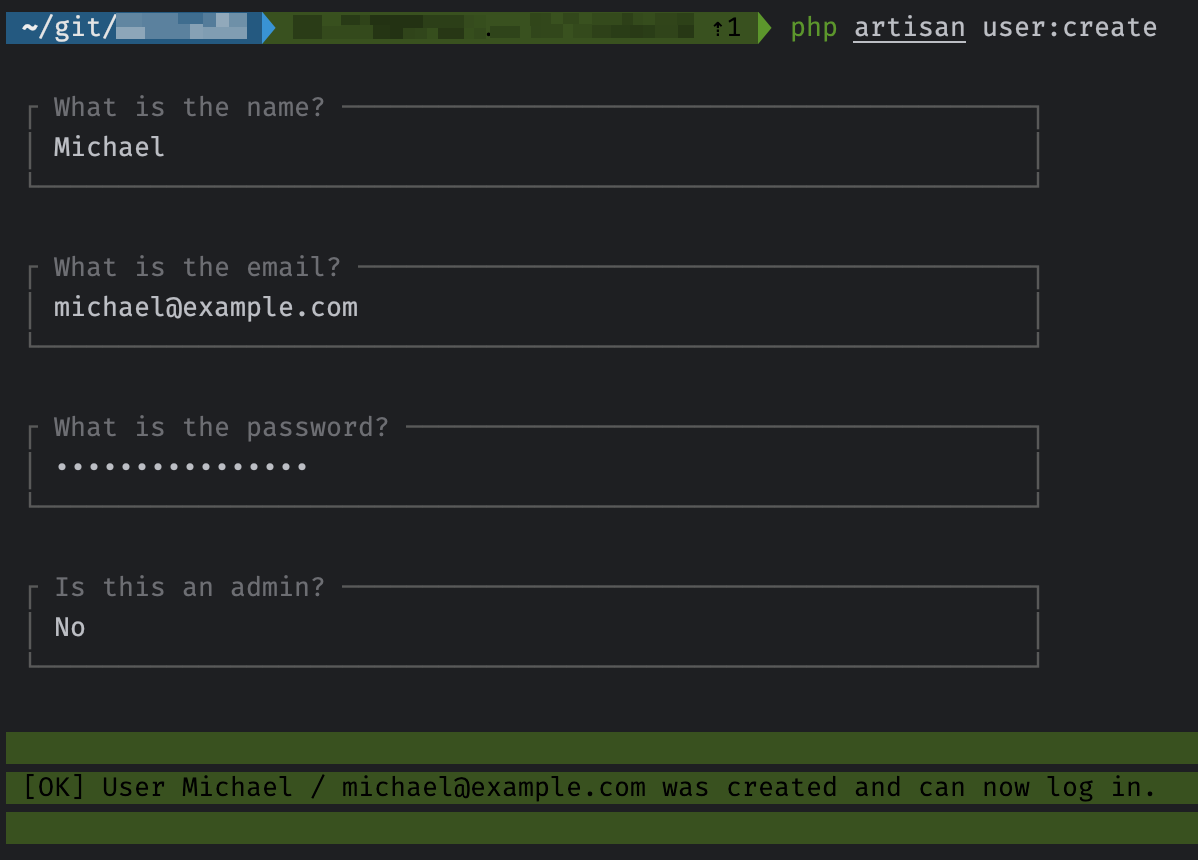
These validations follow the same rules you’d use in Laravel’s standard validation system. The prompts also feature real-time validation and a polished UI.
The validate argument to each of these prompts should be familiar to you, as it uses the same rules as you will find in the Validation chapter of the docs.
Here’s what the command looks like in action:
Putting it all together:
Here is our full final class:
namespace App\Console\Commands;

use App\Models\User;
use Illuminate\Console\Command;
use Illuminate\Contracts\Console\PromptsForMissingInput;
use Illuminate\Support\Facades\Hash;
use Illuminate\Validation\Rules\Password;
use function Laravel\Prompts\password;
use function Laravel\Prompts\select;
use function Laravel\Prompts\text;

class UserCreate extends Command implements PromptsForMissingInput
{
    /** @var string */
    protected $signature = 'user:create {name} {email} {password} {admin}';

    /** @var string */
    protected $description = 'Create a User';

    public function handle(): void
    {
        User::create([
            'name' => $this->argument('name'),
            'email' => $this->argument('email'),
            'password' => Hash::make($this->argument('password')),
            'admin' => (bool) $this->argument('admin'),
        ]);

        $this->output->success("User {$this->argument('name')} / {$this->argument('email')} was created and can now log in.");
    }

    protected function promptForMissingArgumentsUsing()
    {
        return [
            'password' => fn() => password(
                label: 'What is the password?',
                required: true,
                validate: [
                    Password::defaults(),
                ]
            ),
            'email' => fn() => text(
                label: 'What is the email?',
                required: true,
                validate: [
                    'email',
                    'unique:users,email',
                ]
            ),
            'admin' => fn() => select(
                label: 'Is this an admin?',
                options: [
                    '1' => 'Yes',
                    '0' => 'No',
                ],
                default: '0',
                required: true,
            )
        ];
    }
}
Conclusion
Laravel’s PromptsForMissingInput interface offers a clean, extensible way to improve the usability of Artisan commands by prompting for missing arguments and applying validation at runtime. By leveraging Laravel Prompts, you gain fine-grained control over input handling directly within your command classes, making it easier to maintain clear, predictable input flows across your CLI tools.