Using Visual MySQL Explain with Laravel
Understanding bottlenecks in slow SQL queries is the first step in speeding them up. The vast majority of slow SQL queries can be improved with the right indices. But how do you find the right indices?
Well, MySQL (and other SQL engines) have the EXPLAIN command: Prefix any SQL query with EXPLAIN and the SQL engine explains how it will execute the query: which indices will it use, which will it not use. What’s the benefit from each index being used, and which parts of the query are actually the most ’expensive'.
However, this only helps if you can actually understand the output of the EXPLAIN command, and lets face it: EXPLAIN more often than not, really needs a lot of, well, explanation.
This is where mysqlexplain.com comes in handy: It gives you a nice explanation of the EXPLAIN output, and just recently it’s gotten even better by introducing a visual explainer.
Here is an example of a visual explain output:
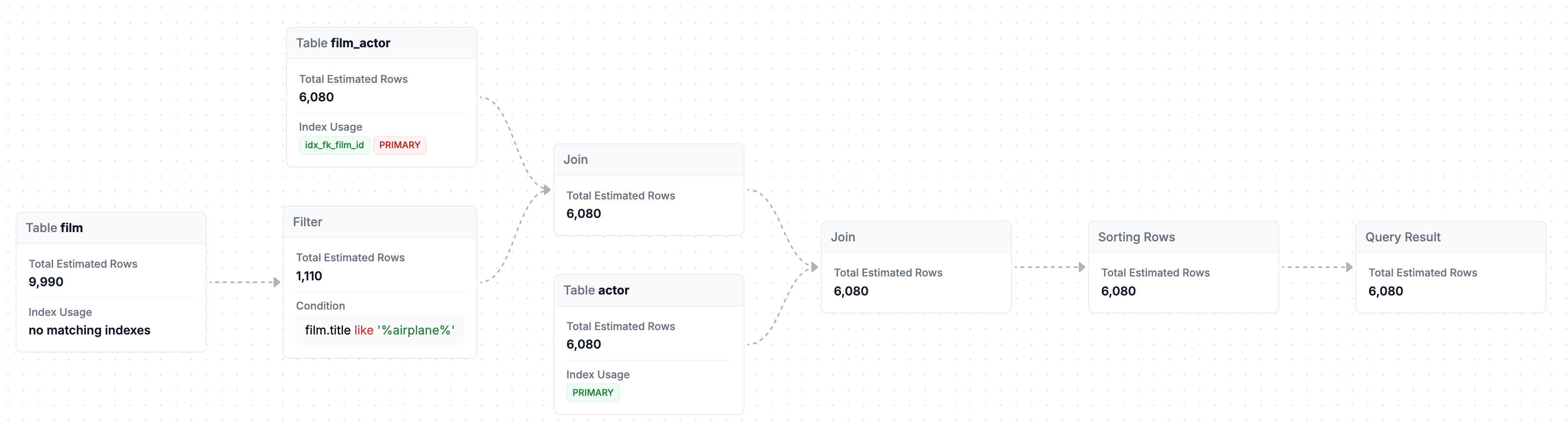
Now, you can simply use mysqlexplain.com by heading over to the website, and following the instructions. You’ll need to paste the result of 4 queries, so this is a bit of work, but totally feasible.
However, if you are using Laravel, the author has also created a composer packages that simplifies things a lot:
Using the laravel-mysql-explain composer package
For users of Laravel, using MySQL EXPLAIN is a lot easier: The laravel-mysql-explain package adds a few methods to Laravel’s query builder that all but automate the use of MySQL EXPLAIN. Let’s have a look at how it works:
Firstly, install the package using composer. We want to install it as a dev-dependency only, as we’ll never use it in production:
composer require --dev tpetry/laravel-mysql-explain
This will add three new methods to the query builder for very easy submission of query plans:
| Type | Action |
|---|---|
visualExplain | returns URL to processed EXPLAIN output |
dumpVisualExplain | dumps URL to processed EXPLAIN output and continue normal execution |
ddVisualExplain | dumps URL to processed EXPLAIN output and stops execution |
I personally, really like the final one, as it just works best with my personal workflow, but if you prefer, the other two are also there.
To illustrate the usage of this, let’s assume we want to investigate the index usage and performance of the below query, which fetches the names of films with the word ‘Airplane’ in the title, and the actors that played in them:
Actor::query()
    ->join('actor_film', 'actor_film.actor_id', '=', 'actors.id')
    ->join('films', 'films.id', '=', 'actor_film.film_id')
    ->where('films.title', 'like', '%airplane%')
    ->select(['films.title', 'actors.name'])
A fairly straightforward join query. If we want to have a look at what MySQL is doing when executing this query, simply add the ->ddVisualExplain() call into this query:
Actor::query()
    ->join('actor_film', 'actor_film.actor_id', '=', 'actors.id')
    ->join('films', 'films.id', '=', 'actor_film.film_id')
    ->where('films.title', 'like', '%airplane%')
    ->ddVisualExplain()
    ->select(['films.title', 'actors.name'])

// "https://mysqlexplain.com/explain/01j2ef1bj7efr97m5v140rnxyz"
This dumps out the URL to the processed, visual MYSQL EXPLAIN output. Open this URL, and you get a beautiful visual explainer of how your MySQL engine will execute this query!
Using MySQL’s EXPLAIN has long been an important part of analysing and improving MySQL query performance. And with the release of visual MySQL explain it just got a whole lot easier!